Features / Dose history
Dose historyA record you can bring to an appointment.
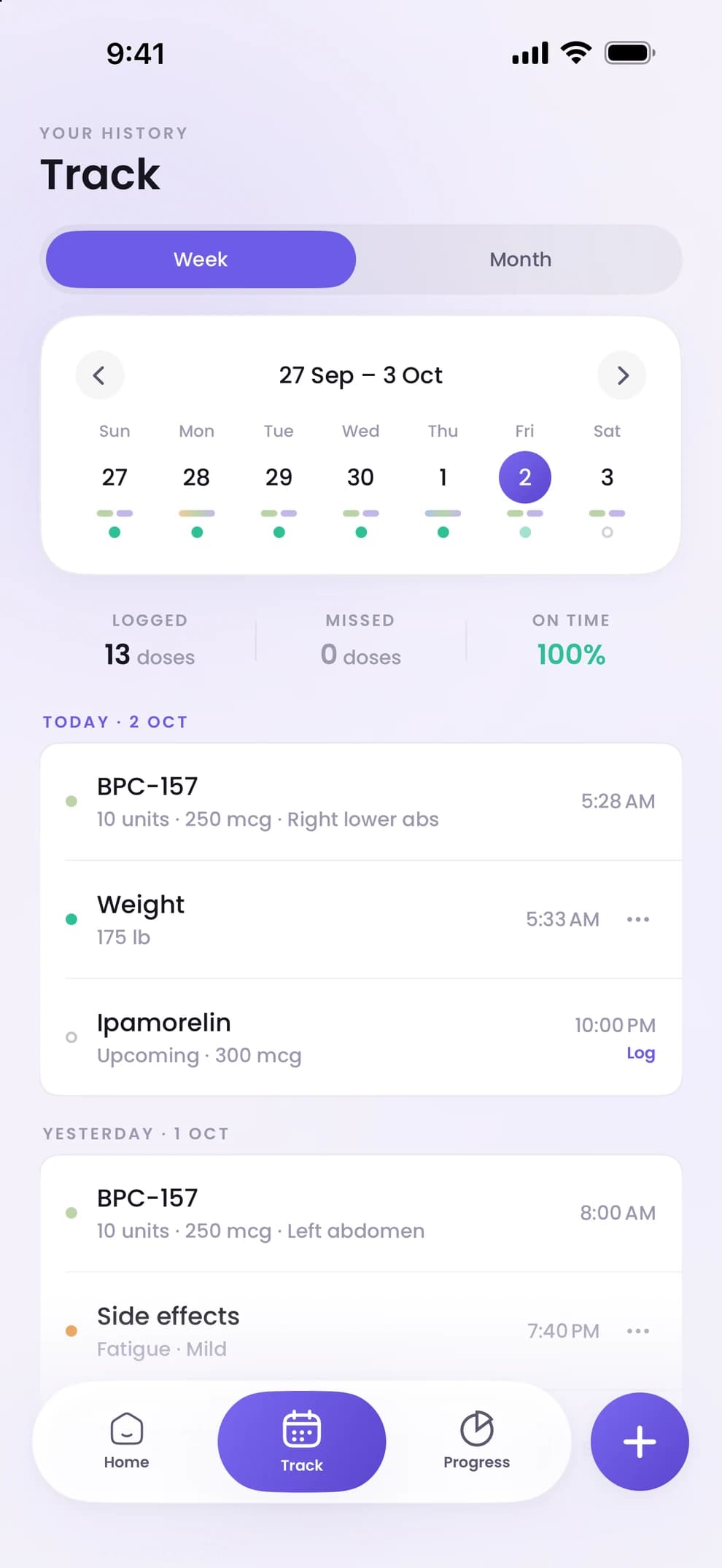
The Track tab is a calendar of everything you have logged. Each dose shows its amount, time and injection site; weigh-ins and side-effect check-ins sit on the same days. Totals show what was logged, what was missed and how often you were on time.
- 01
Everything on one calendar
Doses, weigh-ins and side-effect check-ins are one list, by day. Open a day to see what was logged and when.
- 02
Side effects, rated
A check-in lets you tick the symptoms you noticed and rate each from mild to severe. Peppy does not interpret them; if a side effect worries you, contact your provider.
- 03
Adherence, in numbers
Track totals how many doses were logged, how many were missed and the share taken on time. It is the summary to show at an appointment, built from your own entries.
- 04
Correct a mistake
Tap the three dots beside an entry to delete it. If your iPhone is signed in to iCloud, the change is made in your iCloud backup too.
Dose history, answered.
Step by step: how to track weight, side effects and your dose history. More in the help centre.
- Can I export or share my dose history?
- The Track calendar is designed to be shown at an appointment from your phone. Your entries stay on your iPhone and in your own iCloud backup; nothing is sent to us.
- Is the full history free?
- The free version keeps the dose log for one peptide. Peppy Premium adds the full Track history across all your peptides, plus Progress.
- Does the history include injection sites?
- Yes. Each logged dose records the site you tapped on the body map, along with the amount and time.

Start with your next dose.
Download Peppy, the peptide tracker app for iPhone. Free to start, no account.